UNC Health
- 4.3
- Rating
- 100.00K
- Installs
- Free
- Price

 Analysis by App-foxy
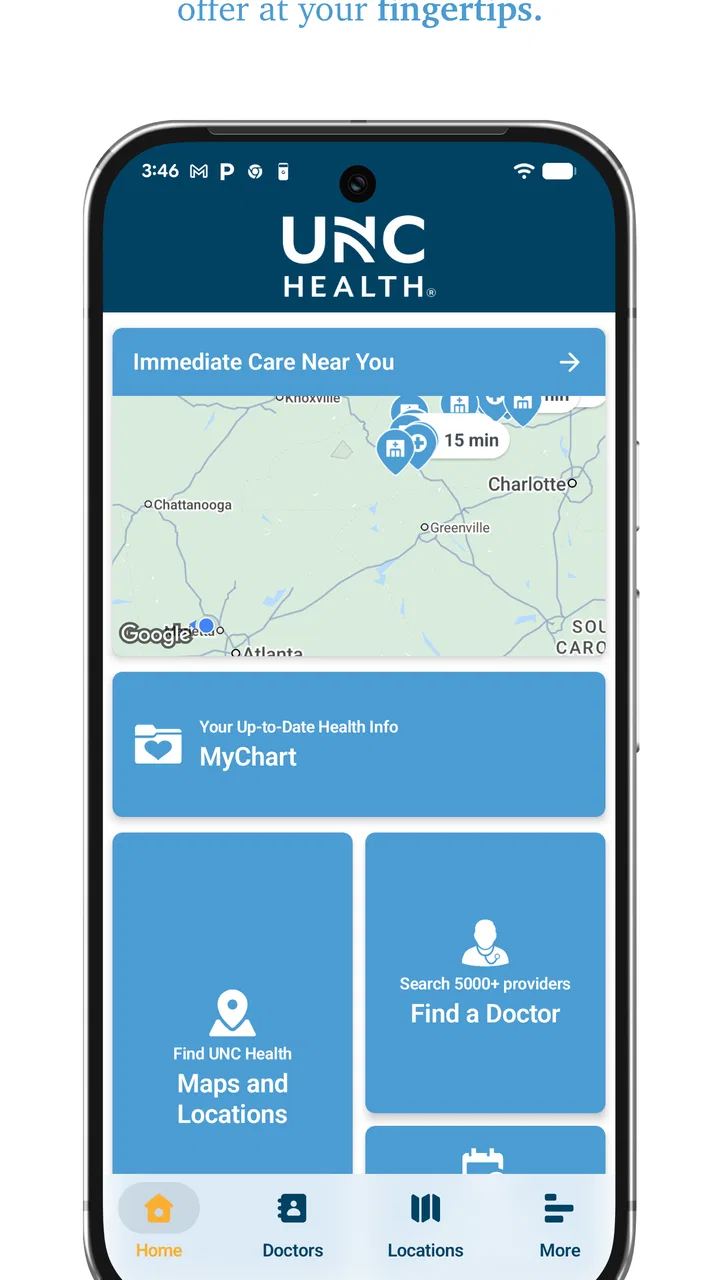
When a medical app is used on a shared household device, the main question is not whether it looks polished. I want to know whether the right person can quickly reach the right part of the app without mixing up appointments, exposing private details, or assuming that a virtual visit replaces urgent emergency care. UNC Health is built around that practical problem. It brings UNC Health services into one mobile place, with tools for finding locations, managing appointments, and reaching virtual urgent care.
I reviewed it as an everyday medical companion rather than as a general wellness tracker. That distinction matters. This is not an app for counting steps, recording meals, or replacing a dedicated medication manager. Its value is tied to the UNC Health system and to the moments when a patient needs to navigate care, check scheduling information, or decide whether virtual urgent care is a suitable next step.
The app is free, intended for Everyone, and developed by UNC Health Care. It has built a modest but meaningful audience, with over one hundred thousand installs and a 4.3 average from roughly two hundred seventy ratings. Those figures suggest that it is established enough to be familiar to many patients, while still feeling more like a focused health-system tool than a universal medical platform.
You May Also Like

 Blood Strike: 2.5 Anniversary
Blood Strike’s Loadouts Turn Every Drop Into a Tactical Gamble
A close look at Blood Strike’s custom loadouts: how fast access to signature weapons reshapes its battle royale rhythm, rewards preparation, and narrows the gap between fights.

 Pandora - Music & Podcasts
Pandora’s Music Is Easy to Start, but Harder to Recover
Pandora’s strength is its low-effort path from a seed to a station. Its weak spot is how much confidence it asks you to place in connection, setup, and quiet recovery.

 8 Ball Pool
 Is Built on Rivalries, Rematches, and Routine
A close look at the rivalries, rematches, shared routines, and unanswered safety questions that turn a quick pool match into a persistent mobile community.

 Samsung Music
’s Quiet Strength Is Playing What You Already Own
Its reach comes less from spectacle than from dependable access to a personal library. That simplicity is both the app’s strongest retention engine and its ceiling.

 AccuWeather: Weather Radar
AccuWeather Review: A Quick, Clear Forecast for Everyday Decisions
For everyday plans, the best forecast is the one you can understand quickly. AccuWeather makes rain timing, radar, and local conditions easy to act on, with a few trade-offs.

 Hill Climb Racing
Why Hill Climb Racing Still Turns Crashes Into One More Run
A tiny car, a bumpy hill and one more upgrade: Hill Climb Racing keeps resurfacing because its simple chaos makes every near-miss feel personal.
More From Our News Desk



How UNC Health fits into a shared household routine
A realistic use case is a household where one person has an appointment at a UNC Health location while another family member is trying to arrange care for a new, non-emergency problem. On a shared tablet or phone, one person may use the wayfinding tools to work out where to go, while another checks scheduling or considers virtual urgent care. That is more useful than opening several unrelated websites and trying to remember which page belongs to which service.
The strongest part of this arrangement is coordination. A family member can help with practical details such as finding a facility or remembering when an appointment is scheduled, without needing a separate navigation app and a separate browser search. I found that especially helpful for appointments at unfamiliar locations, where the challenge is often not medical information but getting to the correct building or service area.
There is an important boundary, though: a shared device is not the same thing as a shared account. Medical information should be treated as personal. If several people use one phone, I would avoid leaving the app open on a screen containing appointment details, and I would not assume that one household login is appropriate for everyone. The app can support family coordination, but it should not be treated as a family noticeboard for private health information.
That distinction also affects how I would use it with an older relative. Helping someone find a clinic or prepare for a virtual urgent-care visit is sensible. Taking over their account or making health decisions on their behalf is a different matter. The app is best used as a coordination aid, with the patient remaining in control of their own information and choices.
What the main tools are good for
The wayfinding function is the most immediately practical feature for a first-time visitor. Medical campuses can be confusing, and a standard map search may identify a broad address without making the relationship between a hospital, clinic, entrance, and appointment destination clear. UNC Health’s focus on health-system wayfinding makes it more relevant than a generic map when the visit is tied to a UNC Health facility.
Scheduling is useful in a different way. Rather than treating an appointment as an isolated calendar entry, the app places it alongside other care-related tasks. That can make preparation easier: I can think about where I am going, when I need to be there, and whether a virtual option is more appropriate for a problem that does not require an in-person visit.
Virtual urgent care is the feature that most clearly separates the app from a simple hospital directory. It offers a route to care without automatically requiring a trip to a facility. That is valuable for a minor or time-sensitive concern when an in-person examination may not be necessary. At the same time, I would not use the presence of this feature as a reason to delay emergency treatment. Severe symptoms, immediate danger, or situations requiring hands-on care should be handled through the appropriate emergency channel.
One non-obvious advantage is the way these tools can be used in sequence. I might begin by checking whether virtual urgent care fits the situation, switch to scheduling if an in-person visit is more suitable, and then use wayfinding once the destination is known. That workflow is more efficient than treating each feature as a separate app. It also reduces the chance of solving only one part of the problem—for example, booking care but forgetting how to reach the correct location.
Setting sensible boundaries before someone else uses the phone
Before handing a shared device to a partner, parent, or teenager, I would first close any screen that displays appointment or care information. I would also make sure the person using the app understands whose account is active. This is a simple habit, but it prevents a common household mistake: one person assumes they are viewing their own details when the device is still showing someone else’s information.
For a family member who needs assistance, I would use the app together rather than leaving them to explore an account they do not own. A good workflow is to identify the immediate task first—finding a location, reviewing scheduling information, or considering virtual urgent care—then stop when that task is complete. This keeps the app from becoming an open-ended browsing session on a shared screen.
I also prefer using the app for coordination before the appointment rather than relying on it as the only source of information during a stressful visit. If someone is heading to care, I would note the relevant time and destination separately in a private household reminder. That is not because UNC Health is unsuitable for scheduling, but because a backup reminder can be useful when a phone battery is low, connectivity is poor, or another family member needs the basic plan without seeing private medical details.
Another practical tip is to separate logistical help from clinical interpretation. A relative can help locate the facility or understand how to begin a virtual urgent-care process. They should not present the app as a diagnostic tool or treat an appointment screen as medical advice. This is where a focused health-system app differs from a symptom checker: its strength is connecting a patient with care services, not deciding what condition the patient has.
Coordinating appointments without turning care into a group chat
Households often share responsibility for transportation, childcare, and reminders. UNC Health can make the coordination side less scattered because the relevant care tasks begin in one place. I can see why a caregiver would appreciate having scheduling and location tools close together, especially when an appointment involves a person who does not regularly travel to the facility.
Still, coordination works best when the household agrees on what information actually needs to be shared. A driver may need the appointment time and destination, but not every detail visible in a patient account. A spouse helping with a virtual urgent-care visit may need to assist with the device, while the patient should remain the person describing symptoms and making decisions. These boundaries make the app more useful, not less, because they prevent helpful support from becoming unnecessary exposure.
The app is also a better fit for households already connected to UNC Health than for families who use several unrelated medical providers. If one person receives care through another system, that provider’s app may still be necessary for their appointments and records. UNC Health can coordinate UNC Health-related tasks, but it is not a universal replacement for every healthcare portal a family may use.
This is one of the clearest trade-offs compared with a general calendar. A calendar is better for sharing a simple appointment time across a household, while UNC Health is better when the user needs health-system context, wayfinding, or access to virtual urgent care. I would use the two differently: the app for care-specific actions and a private or carefully configured calendar for household logistics.
Age, trust, and the limits of a general audience rating
The Everyone content rating makes the app approachable from an age-classification standpoint, but that does not mean every child should independently manage medical information. A young person may be able to help locate a clinic or pass a phone to an adult, yet account access and health decisions require more maturity and trust. The rating describes general content suitability; it does not remove the need for adult supervision around private care details.
For teenagers, the right approach depends on the task. A teenager accompanying a parent might use the wayfinding function with permission. A teenager arranging their own care should understand which account is active and what information may be visible. I would avoid making a shared family device the default place for every person’s medical activity, particularly when multiple accounts or sensitive appointments are involved.
Older adults may benefit from a different kind of support. The app’s value is not only in the digital features themselves, but in reducing the number of steps between “I need care” and “I know where or how to begin.” A trusted helper can sit beside the user, explain the choices, and let the patient perform the important actions. That preserves confidence and avoids turning the helper into an unintentional gatekeeper.
Trust is especially important with virtual urgent care. A family member may be able to help with the technology, but the patient should understand that the virtual route has limits. Some problems need an in-person examination, testing, or emergency attention. I appreciate virtual care as a convenience, but I would judge it by suitability for the situation, not by how quickly it avoids a trip.
Performance expectations and everyday friction
The current version is 3.11.0 and requires at least operating-system version 10. That makes the app accessible to many reasonably modern phones, but it is still worth checking the device before asking an older family member to install it. On a shared household phone, updates and available storage can also become practical concerns, particularly when the device is used by several people for unrelated purposes.
The app’s narrow focus is both its strength and its limitation. Someone who wants UNC Health wayfinding, scheduling, and virtual urgent care in one place will find a clear reason to keep it installed. Someone looking for broad health education, daily wellness tracking, medication reminders, or a complete cross-provider medical record may find it too specialized. In that case, a general health platform or the separate app from another healthcare provider may be a better match.
I would also avoid assuming that every task will feel equally smooth. Wayfinding is naturally useful when the destination is part of the UNC Health network, while its value drops when the user is visiting an unrelated provider. Scheduling is helpful when the patient’s care is represented in the system, but it should not replace personally checking important appointment details before leaving home. And virtual urgent care is convenient only when the concern is appropriate for remote attention.
These are not flaws unique to the interface; they are boundaries of the app’s role. The more closely a user’s needs match UNC Health services, the more coherent the experience becomes. The farther those needs move toward general health management or multi-provider organization, the more likely it is that another tool will need to sit beside it.
Who should install it, and who should skip it
I would recommend UNC Health to patients who regularly use UNC Health facilities and want a single starting point for location help, scheduling, and virtual urgent care. It is also a sensible choice for a caregiver who assists with transportation or appointment preparation, provided the household handles account access carefully.
It is particularly useful when the same person may need different types of support at different times. A scheduled visit may require wayfinding, while a new but non-emergency concern may lead to virtual urgent care. Having those routes together can save time and reduce the temptation to search randomly online for the correct entry point.
I would skip it if I do not receive care through UNC Health, or if my main goal is a broad personal-health dashboard. I would also avoid relying on it as the only medical resource during an emergency, for diagnosis, or for managing every provider in a mixed healthcare household. In those situations, emergency services, direct clinical advice, or another provider’s dedicated platform may be more appropriate.
One useful decision test is simple: ask whether the next likely task is “Where is my UNC Health care, when is it scheduled, or can this concern be handled through virtual urgent care?” If the answer is yes, the app has a clear job. If the answer is “I want to track my health generally,” its features are unlikely to justify becoming a permanent part of the phone.
My household verdict
After using it with a household mindset, I see UNC Health as a practical bridge between patients and a particular healthcare system. It does not try to be everything, and that is a benefit when the user needs a location, an appointment pathway, or virtual urgent care rather than a large collection of wellness tools.
The best experience comes from treating it as a personal medical app that can support shared logistics—not as a shared account for the whole family. Keep account boundaries clear, use wayfinding before unfamiliar visits, use scheduling as part of a wider reminder routine, and treat virtual urgent care as a convenient option rather than a universal answer.
For UNC Health patients, I think the free download earns its place because it brings several practical care tasks together. Its Everyone rating makes it approachable for households, but responsible use still depends on adult judgment, privacy awareness, and knowing when the app is not the right route. My recommendation is positive for UNC Health users who value coordination, with the strongest results coming from careful shared-device habits and realistic expectations about what a health-system app can do.
FAQs for UNC Health
01What services does the UNC Health app offer?
The UNC Health app provides a comprehensive suite of services for patients, including appointment scheduling, access to medical records, prescription refills, and direct communication with healthcare providers. Additionally, users can utilize tools for managing billing and insurance information, making it a versatile application for all healthcare needs.
02Is my personal health information secure on the UNC Health app?
Yes, UNC Health prioritizes the security of your personal health information. The app employs advanced encryption technologies and follows compliance standards like HIPAA to ensure that your data is protected. Users must set up secure login credentials, and two-factor authentication is available for added security.
03Can I use the UNC Health app to communicate with my doctors?
Absolutely, the app facilitates seamless communication with your healthcare providers. Patients can send messages, request prescription refills, and receive test results directly through the app. This feature ensures timely communication and helps maintain a continuous care experience from the comfort of your home.
04Does the UNC Health app integrate with wearable devices or other health apps?
Yes, the UNC Health app can integrate with various wearable devices and health apps. This allows users to sync their fitness data, track vital signs, and share this information with their healthcare providers. Such integration helps in providing a more holistic view of a patient's health status.
05How user-friendly is the UNC Health app for non-tech-savvy individuals?
The UNC Health app is designed with user-friendliness in mind, featuring an intuitive interface that caters to all ages and technical abilities. It includes step-by-step guides, a comprehensive help section, and customer support to assist users who might need extra help navigating the app's features.
Pros
- User-friendly interface simplifies navigation.
- Comprehensive health info at your fingertips.
- Secure messaging with healthcare providers.
- Easy appointment scheduling and reminders.
- Access to test results and medical records.
Cons
- Limited features without internet access.
- Occasional login issues reported by users.
- Lack of customization for notifications.
- Some users find the app's design outdated.
- Doesn't support all healthcare facilities.

UNC Health
Gallery